
Chrome Extension + Web App for WordPress PublishersDev preview
Publish faster in WordPress — with AI help, not plugin bloat.
SEOVault AI helps you write, optimize, refresh, interlink, and publish content through a lightweight Chrome extension and a centralized web app built for serious WordPress workflows.
Works with WordPress and supports workflows built around major SEO plugins like Rank Math, Yoast, and AIOSEO.
Web App UI Languages
 English
 Türkçe
 Español
 Deutsch
 Français
 Português
 日本語
日本語 한국어
한국어 Italiano
 Nederlands
 Polski
Why this exists
WordPress SEO work gets messy fast.
Most publishing teams bounce between the editor, SEO plugins, AI tools, search tabs, and internal link spreadsheets. SEOVault AI brings that work into one cleaner publishing flow — without piling more heavy plugins onto your WordPress site.
Scattered tools, slow workflows.
- Too many tabs open while editing a single post
- Too much copy-paste between AI tools and WordPress
- Too many plugins slowing down your WordPress site
- Internal linking done manually in spreadsheets
- Old posts rotting because updating them takes too long
One cleaner publishing flow.
- Work directly inside the WordPress editor with the extension
- Manage multiple sites from one web app dashboard
- Keep heavy processing outside WordPress entirely
- Automate internal linking across your entire site
- Refresh old posts with light, medium, or heavy rewrites
Core value
Less bloat. Faster publishing. More control.
SEOVault AI is built around three things WordPress publishers actually need: speed in the editor, no extra plugin weight, and the ability to scale when the workflow grows.
Publish Faster
Go from draft to optimized article faster with in-editor analysis, AI generation, document outline support, and one-click injection into your post.
Reduce Plugin Bloat
Keep the heavy work outside your WordPress site. Use the side-panel extension without a plugin, or a lightweight connector for the web app.
Scale Your Workflow
Manage content across multiple sites, save article history, collaborate with team members, and build stronger internal linking workflows from one place.
Two surfaces, one workflow
Two powerful ways to work. One WordPress-focused workflow.
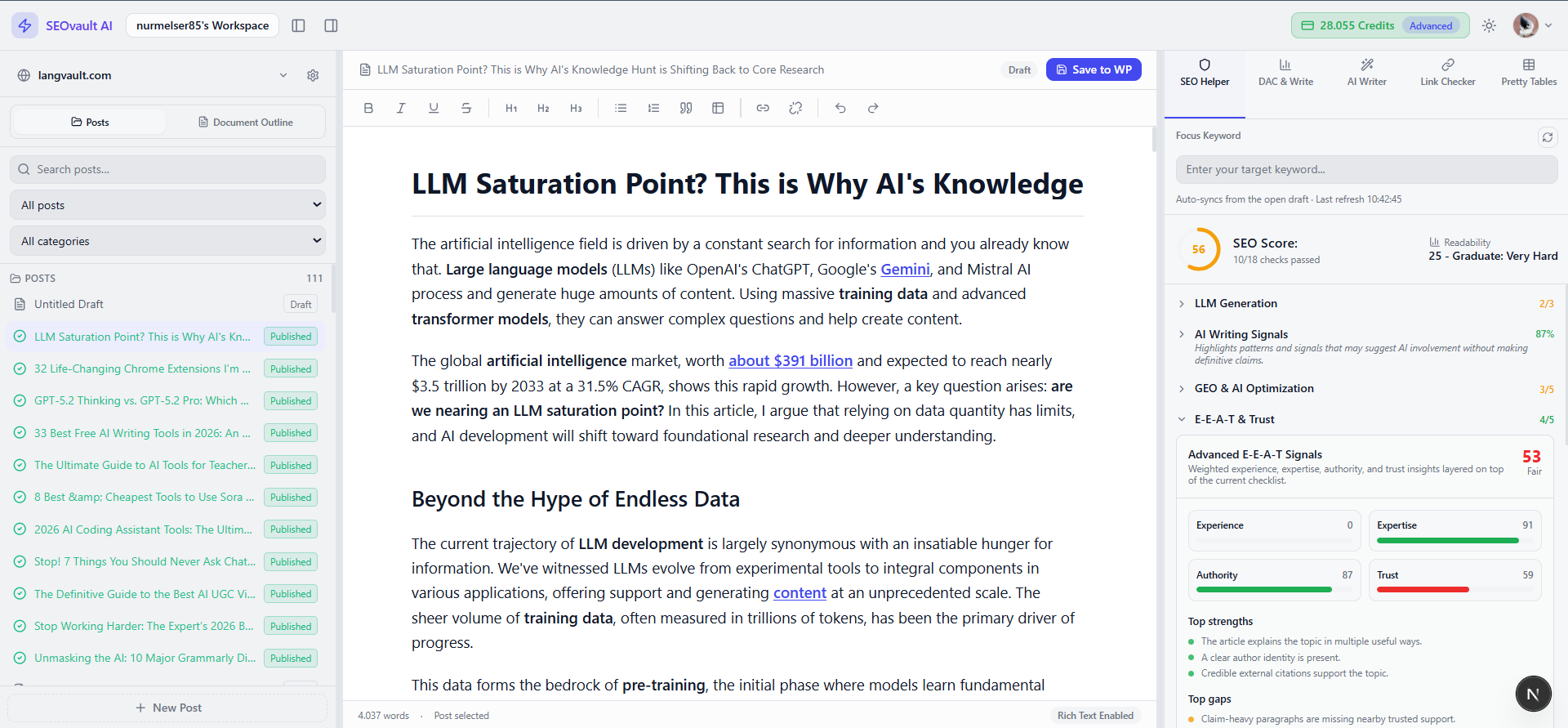
SEOVault AI gives you two connected surfaces: a Chrome extension for fast in-editor work, and a web app for deeper publishing, multi-site management, internal linking, and team collaboration. Most core features exist in both. Each also has unique strengths.
Chrome ExtensionFast, in-editor SEO help
Best for hands-on writers who want to work directly inside the native WordPress editor.
- Opens as a lightweight side panel inside the post editor
- Analyze drafts without adding a heavy SEO helper plugin
- Use Zen Mode to darken the editor and focus on writing
- Generate and inject titles, meta ideas, TL;DR, FAQs, and formatting directly into the draft
- Right-click tools across the web for screenshot capture, word count, and note saving
- Save research in SEO Snippets
Web AppA command center for scale
Best for publishers, agencies, and teams managing multiple sites and larger workflows.
- Connect and manage multiple WordPress sites from one dashboard
- Open, edit, preview, and save posts from a centralized workspace
- Advanced internal linking and autolinking with AI anchor rewrites
- Save generated drafts and revisions in cloud history
- Invite teammates into shared workspaces
- Ultra-lightweight connector plugin for WordPress sync
Feature highlights
Built for the work that actually eats your publishing time.
These are the features that save the most time in real WordPress publishing workflows — not every feature, just the ones that matter most.
Ultra Writer + Presets
Write for real publishing scenarios, not generic AI output. Generate long-form content using presets like how-to guides, listicles, comparisons, reviews, buyer's guides, case studies, opinion pieces, custom templates, and brand-guided writing.
Rewrite Existing Articles
Refresh old content without starting from scratch. Use rewrite modes for light, medium, or heavy updates to revive older posts and improve weak or outdated pages.
Internal Linking + Autolinking
Turn internal linking into a workflow, not a chore. Find relevant internal links, inject them faster, and use web-app autolinking to build stronger site structure at scale.
Deep Analysis / DAC
Get actionable SERP-aware recommendations. Use deep analysis to identify information gain opportunities, semantic gaps, structure improvements, E-E-A-T fixes, and freshness issues.
Rich Blocks / Pretty Tables
Turn plain content into stronger visual sections. Generate tables, comparison layouts, mobile cards, and richer content blocks without manual coding.
Multi-Site + Team Workflow
Built for serious publishing operations. Manage more than one WordPress site, store article history, and collaborate with editors or writers from one workspace.
Pricing
Start free. Upgrade when your workflow grows.
Choose the plan that fits your publishing volume — from testing the workflow to agency-level output.
Free plan includes 50 credits on sign-up. Paid plans include monthly credits and autolink applies. AI credits are consumed when features run.
See full pricingFAQ
Common questions from WordPress publishers.
Yes — SEOVault AI is built specifically for WordPress publishers. The extension works inside the WordPress editor, and the web app connects directly to your WordPress sites for publishing, internal linking, and multi-site management.
The Chrome extension opens as a side panel inside the WordPress editor for fast, in-context work — analyze drafts, generate content, inject improvements without leaving the editor. The web app is a centralized workspace for multi-site management, advanced internal linking, autolinking, team collaboration, and cloud history. Most core features exist in both.
The Chrome extension works without any WordPress plugin — it reads your draft directly from the editor. The web app uses an ultra-lightweight connector plugin only for secure API communication and publishing sync.
SEOVault AI reduces time on SEO analysis, title and meta generation, content writing and rewriting, internal linking, FAQ and TL;DR creation, and formatting — all from one connected workflow instead of scattered tools and tabs.
Start with the workflow that fits you
Use the extension for speed inside WordPress, or the web app when you need scale.
Stay in the editor when you want speed. Move to the web app when you need multi-site control, collaboration, and deeper linking operations.